

Building Information Modelling projects often stall due to fragmented workflows, delayed coordination, and unclear handoffs between disciplines. Architects and structural engineers face rework, clash detection failures, and missed deadlines when BIM process steps lack structure. This guide delivers a practical framework to implement engineering BIM workflows that reduce errors, accelerate design cycles, and improve collaboration. You will learn the four essential BIM phases, preparation requirements, execution best practices, and verification techniques to ensure project success from concept through operations.
Table of Contents
- Understanding The Engineering BIM Workflow Phases
- Preparing For Engineering BIM: Tools, Standards, And Team Alignment
- Executing The Engineering BIM Process Steps Effectively
- Verifying And Maintaining BIM Models For Project Success
- Explore Expert Structural BIM Modelling And Drafting Services
- Frequently Asked Questions
Key takeaways
| Point | Details |
|---|---|
| Structured BIM phases | Four distinct workflow phases organise analysis, design, construction, and operations for predictable outcomes. |
| Early collaboration | Cross-discipline data sharing from project start prevents costly late-stage clashes and rework. |
| Avoid over-modelling | Excessive early detail slows processing and increases costs without improving design quality. |
| Current standards matter | Outdated BIM templates and protocols cause misalignment, errors, and project delays. |
| Project-specific templates | Customised families and naming conventions improve accuracy and reduce coordination risks. |
Understanding the engineering BIM workflow phases
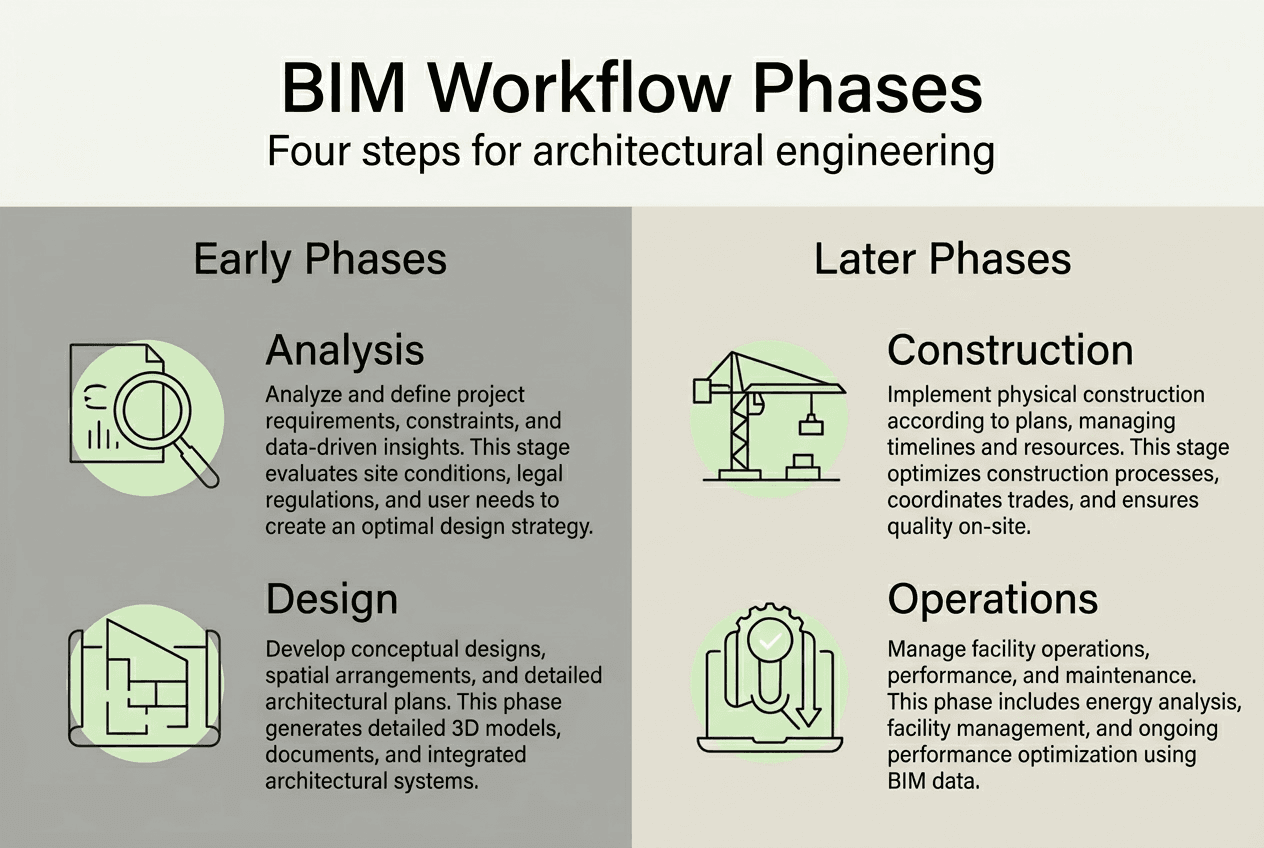
A reliable BIM workflow follows four practical phases with specific purposes and deliverables. Each phase builds on the previous, creating a seamless handoff from analysis through operations. Understanding these phases helps architects and structural engineers plan resources, assign responsibilities, and set realistic milestones.
The first phase, analysis and evaluation, establishes project feasibility and constraints. Teams assess site conditions, regulatory requirements, and client objectives. Deliverables include preliminary models, feasibility studies, and constraint documentation. Architects and engineers collaborate to identify structural challenges early, reducing surprises during detailed design.
The second phase, plan and design implementation, transforms concepts into coordinated models. Structural engineers develop detailed framing systems, load calculations, and connection designs. This phase produces construction-ready models, clash detection reports, and coordinated drawings. The structural drawings workflow integrates architectural and MEP disciplines to ensure spatial coordination.
Construction execution follows, where models guide fabrication, sequencing, and quality control. Contractors extract shop drawings, quantity takeoffs, and construction schedules from federated models. Real-time updates capture field changes and maintain model accuracy throughout the build phase.
The final phase, operations and maintenance, transitions models to facility management teams. As-built models support space planning, equipment tracking, and lifecycle maintenance. This phase delivers the most long-term value but often receives inadequate attention during design.
| Phase | Primary goal | Key participants | Main deliverables |
|---|---|---|---|
| Analysis & evaluation | Establish feasibility and constraints | Architects, engineers, clients | Preliminary models, feasibility studies |
| Plan & design | Develop coordinated construction models | Design team, consultants | Construction models, clash reports, drawings |
| Construction | Guide fabrication and quality control | Contractors, fabricators | Shop drawings, schedules, as-built updates |
| Operations & maintenance | Support facility lifecycle management | Facility managers, owners | As-built models, equipment data, maintenance schedules |
Pro Tip: Involve facilities management representatives during design phases to capture operational data requirements early, preventing expensive model rework after handover.
Preparing for engineering BIM: tools, standards, and team alignment
Successful BIM execution depends on thorough preparation before modelling begins. Teams must select compatible software, adopt current standards, and establish clear communication protocols. Skipping preparation leads to fragmented models, incompatible file formats, and coordination failures.

Choosing the right tools starts with understanding project requirements and team capabilities. Common BIM platforms for structural engineering include Autodesk Revit, Tekla Structures, and Bentley STAAD. Each offers strengths in specific project types or regional markets. Ensure all team members use compatible software versions and agree on file exchange formats like IFC or native formats.
Adopting up-to-date BIM standards prevents costly misalignment. Reference ISO 19650-2 clauses 5.2 and 5.3 for mandatory information exchanges and naming rules. Outdated templates carry legacy errors, incompatible parameters, and non-compliant metadata that cascade through projects. Update project templates annually and verify compliance with current building codes.
Establishing team roles and communication protocols ensures accountability and reduces duplicated effort. Successful BIM implementation requires clear communication and data sharing protocols between architects and structural engineers. Assign a BIM manager to coordinate model federation, resolve clashes, and maintain standards compliance. Define who creates, reviews, and approves each model element.
Common challenges to overcome BIM adoption challenges include resistance to new workflows, insufficient training, and unclear return on investment. Address these through phased implementation, targeted training programmes, and documenting efficiency gains.
Prerequisite steps before BIM execution:
- Confirm software compatibility and licensing across all project participants
- Establish naming conventions for files, views, and model elements
- Define Level of Information Need for each project phase and discipline
- Create project-specific templates with approved families and parameters
- Set up shared coordinate systems and survey control points
- Document clash detection protocols and resolution workflows
- Schedule regular coordination meetings and model exchange milestones
Understanding essential BIM deliverables helps teams plan outputs and allocate resources effectively throughout project phases.
Pro Tip: Avoid over-specifying Level of Information Need in early design phases, as excessive detail requirements increase modelling time and costs without improving decision quality.
Executing the engineering BIM process steps effectively
Executing BIM steps in the correct sequence minimises errors and prevents rework. Following a structured approach ensures models support downstream activities like fabrication, scheduling, and cost estimation. This section outlines practical execution steps with common pitfalls to avoid.
Engineering BIM execution steps:
- Establish the federated model structure with clear discipline ownership and exchange protocols
- Create structural grids, levels, and reference planes aligned to architectural coordination model
- Model primary structural systems including foundations, columns, beams, and floor systems
- Add secondary elements like bracing, connections, and reinforcement as design progresses
- Integrate architectural and MEP models at regular intervals for clash detection
- Run automated clash tests and document resolution strategies for each conflict
- Extract construction drawings, schedules, and quantity takeoffs from coordinated models
- Update models continuously as design evolves and field conditions change
Avoiding excessive early modelling detail reduces processing times and keeps models agile during design development. Over-detailed models in schematic phases slow software performance, complicate revisions, and waste resources on elements likely to change. Model only the detail necessary for current phase decisions.
Timing model integration affects clash detection effectiveness and rework costs. Early integration identifies spatial conflicts when changes cost less to implement. Delaying cross-discipline model integration leads to late issue resolution and costly rework. Schedule weekly or bi-weekly model exchanges during active design phases.
| Integration approach | Clash detection timing | Rework impact | Coordination quality |
|---|---|---|---|
| Early integration (weekly) | Issues found in design phase | Low cost, easy changes | High, proactive coordination |
| Late integration (monthly) | Issues found near construction | High cost, difficult changes | Low, reactive fixes |
Proper clash detection reduces change orders and construction delays. The use of BIM for clash detection can reduce change orders by up to 40%. Run clash tests at multiple tolerance levels to catch both hard clashes (physical conflicts) and soft clashes (clearance violations). Prioritise resolving structural clashes with MEP systems, as these typically require the most coordination.
The use of BIM for clash detection can reduce change orders by up to 40%, transforming construction coordination and project profitability.
Understanding why BIM aids communication in building design projects helps teams leverage visualisation and data sharing for better outcomes. Staying current with BIM modelling trends 2026 ensures your workflows incorporate industry best practices and emerging technologies.
Pro Tip: Use project-specific structural families with embedded engineering parameters to improve calculation accuracy and reduce modelling errors across similar elements.
Verifying and maintaining BIM models for project success
Verification and maintenance ensure models remain accurate, coordinated, and useful throughout project lifecycles. Regular quality checks catch errors before they propagate to construction documents or fabrication files. Systematic maintenance preserves model integrity as designs evolve and teams change.
Regular model reviews identify inconsistencies, missing information, and standards violations. Schedule formal reviews at phase milestones and informal checks weekly during active design. Reviews should cover geometric accuracy, parameter completeness, naming convention compliance, and clash resolution status.
Updating BIM standards keeps projects aligned with evolving codes, client requirements, and industry practices. Outdated BIM standards lead to costly delays, errors, and misalignment in structural engineering projects. Establish a standards review cycle and communicate updates to all project participants promptly.
Common verification tasks and quality assurance checklist:
- Validate structural grid alignment across all discipline models
- Confirm load-bearing elements match structural calculations and specifications
- Verify connection details include all required fasteners and reinforcement
- Check material properties and specifications match project standards
- Ensure view templates and sheet layouts follow documentation standards
- Audit metadata and parameters for completeness and accuracy
- Test model exports to fabrication formats for data integrity
- Document all model changes in revision logs with clear descriptions
Linking model updates to downstream deliverables maintains consistency across documentation sets. When structural members change, automatically update related shop drawings, schedules, and quantity takeoffs. This coordination prevents the costly mismatches between models and construction documents that plague traditional workflows.
Maintaining naming conventions and metadata tagging ensures models remain navigable and searchable as they grow in complexity. Consistent naming helps new team members orient quickly and supports automated quality checks. Metadata tagging enables filtering, scheduling, and data extraction for facility management systems.
| Standards approach | Error frequency | Coordination quality | Project timeline impact |
|---|---|---|---|
| Outdated standards | High, frequent misalignment | Poor, reactive fixes | Delays from rework cycles |
| Current standards | Low, proactive prevention | High, seamless coordination | On schedule, predictable delivery |
BIM’s role in operations and maintenance phases delivers long-term value beyond construction. As-built models support space planning, equipment replacement, and energy management throughout building lifecycles. Capture operational data during design to maximise facility management benefits.
Learning how to review structural drawings effectively can cut errors by 40 per cent, improving both design quality and construction outcomes. Discovering ways to optimise drafting efficiency in BIM projects for 2026 helps teams deliver more with existing resources.
Pro Tip: Maintain a master naming convention document accessible to all team members and reference it during model audits to ensure consistency across disciplines and project phases.
Explore expert structural BIM modelling and drafting services
Implementing engineering BIM process steps requires expertise, time, and resources that many architecture and engineering firms struggle to maintain in-house. BIM.Supply specialises in professional BIM modelling and drafting services designed specifically for architects, engineers, and contractors managing complex projects.

Our structural BIM modelling from concept to completion service delivers coordinated models at transparent unit-rate pricing, eliminating budget uncertainty. We handle everything from preliminary framing layouts through construction-ready models with full clash detection and coordination.
Need detailed construction documentation? Our architectural and structural detail drafting services produce shop-ready drawings that contractors can build from directly. We also offer professional drafting support on an hourly basis for teams needing flexible assistance during peak workload periods or specialised tasks.
Frequently asked questions
What are the four main phases of engineering BIM workflows?
The four phases are analysis and evaluation, plan and design implementation, construction execution, and operations and maintenance. Each phase has distinct goals, participants, and deliverables that build on previous work. Proper phase transitions prevent information loss and coordination failures.
How can I avoid over-modelling in early BIM phases?
Model only the detail necessary for current phase decisions and approvals. Excessive early detail slows software performance, complicates revisions, and wastes resources on elements likely to change. Increase detail progressively as design certainty increases and construction approaches.
Why does early model integration matter for clash detection?
Early integration identifies spatial conflicts when design changes cost less to implement. Delaying integration until late design or construction phases leads to expensive rework, change orders, and schedule delays. Weekly or bi-weekly model exchanges during active design catch issues proactively.
What happens when BIM standards become outdated?
Outdated standards cause misalignment between disciplines, parameter incompatibilities, and non-compliant metadata that cascade through projects. Teams waste time fixing preventable errors and struggle with coordination failures. Update project templates annually and verify compliance with current codes.
How does BIM support operations and maintenance phases?
As-built models provide facility managers with accurate spatial data, equipment specifications, and maintenance schedules. This information supports space planning, equipment replacement, energy management, and lifecycle cost analysis. Capturing operational data during design maximises long-term facility management value.
What preparation steps are essential before starting BIM execution?
Confirm software compatibility, establish naming conventions, define Level of Information Need, create project-specific templates, set up shared coordinates, document clash protocols, and schedule coordination meetings. Thorough preparation prevents fragmented models, incompatible files, and coordination failures that derail projects.