

Poor document management is quietly draining construction budgets across the industry. Document errors cost £21B annually in the UK alone, and the root cause is almost always the same: fragmented workflows, inconsistent naming, and teams working from different document versions. For project managers, this is not just an administrative headache. It is a direct threat to project timelines, budgets, and legal compliance. The good news is that a structured, BIM-enabled document workflow can eliminate most of these risks before they escalate into costly disputes or rework.
Table of Contents
- Understanding the core construction document workflow
- Preparation: Standardising document control for project success
- Execution: Automating and managing document workflows
- Verification: Troubleshooting and error prevention in workflows
- How BIM services enhance coordination and workflow efficiency
- Unlock workflow efficiency with BIM.Supply solutions
- Frequently asked questions
Key Takeaways
| Point | Details |
|---|---|
| Eight-step workflow | Following all eight steps ensures document accuracy, legal compliance, and smooth project flow. |
| Standardisation matters | Project-wide standards and automated workflows reduce confusion and costly mistakes. |
| BIM maximises efficiency | BIM platforms provide coordinated document access, collaboration, and reduce errors. |
| Audit regularly | Frequent audits and revision tracking are critical for preventing workflow breakdowns. |
Understanding the core construction document workflow
Every construction project generates an enormous volume of documents. Drawings, specifications, RFIs, submittals, contracts, and change orders all need to move through a defined process to remain accurate and legally sound. The core workflow involves eight essential stages: intake, classification, version control, review, access management, updates, audit trail, and archiving.
Here is how each step functions in practice:
- Intake — All incoming documents are logged and assigned a unique identifier upon receipt.
- Classification — Documents are sorted by type, discipline, and project phase for easy retrieval.
- Version control — Every revision is tracked with a clear numbering system so teams always know which version is current.
- Review — Designated reviewers approve or reject documents before they are distributed.
- Access management — Role-based permissions ensure only authorised personnel can view or edit sensitive files.
- Updates — Approved revisions replace previous versions and all stakeholders are notified automatically.
- Audit trail — Every action is logged with a timestamp and user ID for accountability and compliance.
- Archiving — Completed project documents are stored securely for future reference and legal protection.
Understanding the BIM process steps alongside these workflow stages helps project managers align their document control with broader project delivery requirements.
| Step | Responsible party | Required tool |
|---|---|---|
| Intake | Document controller | CDE or project management platform |
| Classification | Document controller | Folder taxonomy system |
| Version control | BIM manager | BIM platform or CDE |
| Review | Project manager or lead engineer | Markup and approval tools |
| Access management | IT or document controller | Permission-based CDE |
| Updates | Document controller | Automated notification system |
| Audit trail | Document controller | CDE with logging features |
| Archiving | Project manager | Cloud storage or document archive |
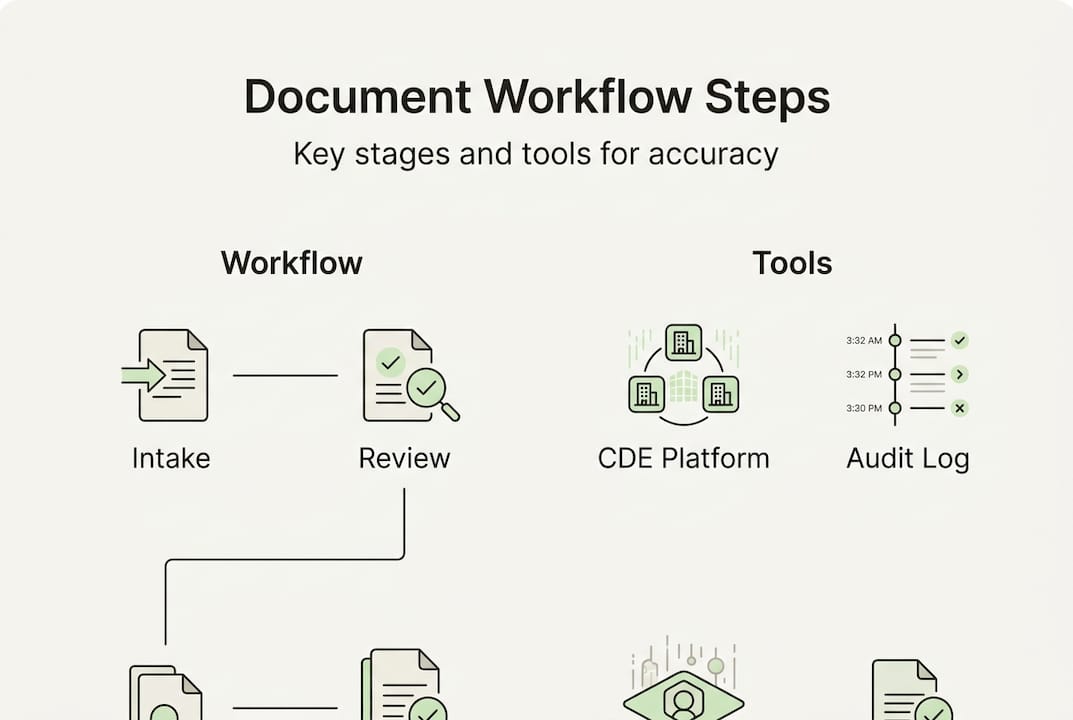
Most errors occur during version control and access management, where manual processes and email-based sharing create confusion. Reviewing your BIM checklist for 2026 can help you confirm that your workflow covers every critical control point.
Preparation: Standardising document control for project success
With workflow steps mapped out, preparation starts by setting up standards and automated controls. Standardisation includes cloud access, audit loops, structured folders, and automated workflows for submissions like RFIs and submittals. Without these foundations, even the best team will struggle to maintain consistency across a complex project.
The difference between manual and digital approaches is significant:
| Approach | Version control | Access | Audit trail | Automation |
|---|---|---|---|---|
| Manual (paper/email) | Inconsistent, error-prone | Unrestricted, untracked | Minimal or absent | None |
| Digital (cloud CDE) | Automated, timestamped | Role-based, controlled | Full log of all actions | RFIs, submittals, notifications |
A structured folder hierarchy is the backbone of any standardised system. Consider organising folders by:
- Project phase (design, tender, construction, handover)
- Document type (drawings, specifications, contracts, reports)
- Discipline (architectural, structural, mechanical, electrical)
- Revision status (current, superseded, archived)
Naming conventions matter just as much as folder structure. Every file should include the project code, document type, discipline code, and revision number. This prevents the all-too-common scenario where two team members are working from files named “Final_v2” and “Final_FINAL.”
The benefits of BIM extend directly into document preparation, as BIM platforms enforce consistent naming and classification rules automatically. Pairing BIM with a cloud CDE also improves BIM content efficiency by reducing the time teams spend searching for the right file.
Pro Tip: Establish your naming convention and folder structure before the first document is created. Retrofitting a system mid-project is far more disruptive than setting it up correctly from day one.
Execution: Automating and managing document workflows
With preparation complete, the next step is executing robust and automated workflows. Cloud CDE and BIM platforms like Procore and Autodesk Construction Cloud are purpose-built for this, offering automated routing, approval chains, and real-time notifications that remove the manual burden from your team.
Setting up an effective automated workflow involves these steps:
- Define document control owners — Assign a named individual responsible for each document category.
- Configure role-based permissions — Set who can create, review, approve, and archive documents within the CDE.
- Build automated approval chains — Route documents to the correct reviewer automatically based on type and discipline.
- Enable automated notifications — Alert stakeholders when documents are submitted, approved, or revised.
- Activate mobile field access — Ensure site teams can retrieve current drawings and markups from any device.
- Integrate with project management tools — Connect your CDE to scheduling and cost management platforms for full project visibility.
Role-based permissions and field access prevent rework and disputes by ensuring every team member works from the same approved version. This is not a luxury feature. It is a baseline requirement for any project with more than a handful of stakeholders.
The BIM deliverables your team produces are only as useful as the workflow that distributes them. Investing in drafting efficiency at the production stage means nothing if the distribution process is broken.
“A single source of truth and role-based access prevents costly rework and protects every stakeholder from disputes down the line.”
Pro Tip: Enable mobile access for your site supervisors so they can pull up the latest approved drawings on-site without calling the office. This alone eliminates a significant source of version confusion.
Verification: Troubleshooting and error prevention in workflows
After automating workflows, verification is critical to catching errors before they escalate. The most common workflow errors include version confusion, outdated documents reaching the site, and manual administrative overload during deadline-driven phases.

The financial stakes are real. Document workflow errors cost the UK construction industry £21 billion every year, and the majority of those costs trace back to preventable process failures.
Here are the top error sources and how to address them:
- Version confusion — Enforce a single CDE with locked superseded files so outdated versions cannot be accessed.
- Outdated site documents — Automate distribution so site teams always receive the latest approved revision.
- Manual admin overload — Use automated workflows to handle routing, notifications, and logging without human intervention.
- Deadline-driven shortcuts — Build review windows into your programme so approvals are never skipped under pressure.
- Poor onboarding — Train every new team member on document control procedures before they access the system.
Expert best practices recommend assigning a dedicated document control owner, conducting regular audits, implementing a formal sheet swap process, and using BIM execution plans to manage live revision control across disciplines.
Connecting BIM and communication protocols ensures that revision updates are communicated clearly to all parties. A well-structured structural drawings workflow is a practical example of how BIM integration reduces revision errors at the discipline level.
Pro Tip: Schedule a formal document audit at every major project milestone. A 30-minute review at the end of each phase catches far more errors than a reactive scramble during construction.
How BIM services enhance coordination and workflow efficiency
With verifications in place, project managers should leverage BIM to maximise workflow efficiency. BIM is essential for project-wide coordination, enabling a single source of truth that all disciplines access simultaneously. This eliminates the information silos that cause the majority of coordination failures on complex projects.
BIM workflow enhancements that directly improve document management include:
- Centralised cloud access — All project stakeholders work from one live model and document set.
- Automated audit trails — Every model change and document action is logged without manual input.
- Clash detection — Design conflicts are identified in the model before they become site problems.
- Integration with project management tools — BIM data feeds directly into scheduling, cost, and procurement platforms.
- Structured information delivery — BIM execution plans define what information is delivered, by whom, and when.
Multidisciplinary BIM coordination has been shown to cut design changes significantly on complex projects, reducing the volume of revised documents that flow through your workflow. Structural BIM efficiency is a clear example of how discipline-level BIM adoption translates into fewer errors and faster approvals.
“BIM services are the backbone of modern construction workflow efficiency, connecting every discipline through a single, controlled information environment.”
Unlock workflow efficiency with BIM.Supply solutions
Streamlining your construction document workflow is not a one-time fix. It requires the right tools, the right processes, and the right team behind your BIM deliverables. At BIM.Supply, we work directly with project managers, architects, engineers, and contractors to deliver precise BIM modelling and drafting services that integrate seamlessly into your existing document control systems.
Our BIM modelling services are priced at a transparent unit rate, so you know exactly what you are getting without the overhead of a full in-house team. Whether you need clash-free coordination models or discipline-specific deliverables, we produce work that fits your workflow from day one. Our drafting support services give your team flexible, on-demand capacity to handle revision cycles, sheet production, and documentation without bottlenecks. If your document workflow needs a stronger foundation, we can help you build it.
Frequently asked questions
What are the most common workflow mistakes in construction document management?
The most frequent mistakes are poor version naming, email-based file sharing, outdated documents reaching the site, and manual administrative overload. These workflow errors collectively cost the UK construction industry £21 billion annually.
How can BIM services improve document coordination?
BIM creates a single source of truth that all disciplines access simultaneously, automates document control, and boosts project-wide coordination by eliminating information silos and reducing revision conflicts.
What are the benefits of using a cloud-based CDE for construction document workflows?
Cloud CDEs provide central access, automated version control, full audit trails, and role-based permissions. These features streamline workflows and reduce the administrative burden on your document control team significantly.
How often should project managers audit their document workflows?
Best practice is to audit at every major project milestone and after each revision cycle. Regular milestone audits catch errors early and ensure your document control system remains accurate and compliant throughout the project lifecycle.